How to Turn Your Cat Photo into a Luxury Studio Portrait
Discover how to turn your cat's everyday photo into a luxury studio portrait with elegant lighting, beautiful backgrounds, and professional AI photography.
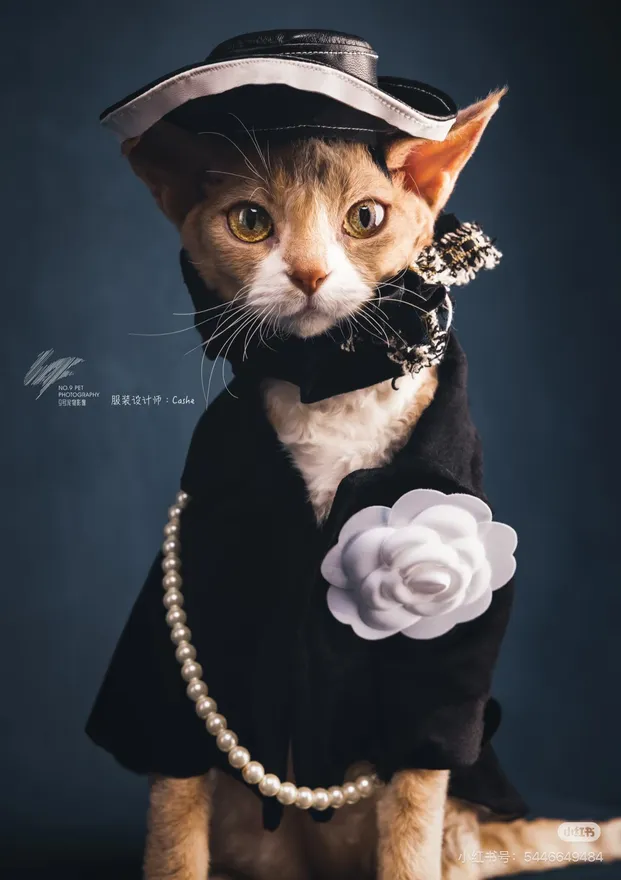
What if your cat had their own professional photoshoot?
Imagine a beautifully lit studio, an elegant background, and your cat looking like the star of a luxury photography campaign.
You don't need to book a photographer to create this look.
AI pet portrait generators make it possible to transform everyday cat photos into polished, professional-looking artwork.
What Is a Luxury Pet Portrait?
A luxury pet portrait is designed to make your pet look elegant and sophisticated.
Unlike ordinary snapshots, these portraits often feature:
- Soft, carefully balanced lighting.
- Elegant backgrounds.
- Professional composition.
- Detailed fur and facial features.
- A clean editorial photography aesthetic.
Think of a high-end magazine photoshoot, but with your cat as the star.
1. Choose the Right Reference Photos
Start with a few clear photos of your cat.
For a luxury portrait, try to choose pictures where:
- Your cat is looking toward the camera.
- Their face is well-lit.
- Their fur is clearly visible.
- Their body isn't hidden behind objects.
- The image isn't overly filtered.
You can use ordinary smartphone pictures. Professional equipment isn't necessary.
2. Explore Luxury Photography Styles
There are several ways to create an elegant pet portrait.
Luxury Editorial Portrait
This style gives your cat the appearance of a professional magazine photoshoot.
Studio Portrait
A clean and timeless look that keeps the attention on your cat.
Dramatic Studio Portrait
A more artistic style with stronger lighting and deeper shadows.
Royal Portrait
Perfect if you want something more creative. Your cat can become a noble character in an elegant historical setting.
SoulPaw includes several portrait templates that make exploring these looks easier.
3. Create Your Portrait with SoulPaw
You can create an AI pet portrait in just a few steps:
- Open SoulPaw.
- Upload 2–4 clear photos of your cat.
- Browse the portrait templates.
- Select a style that matches your vision.
- Generate and download your portrait.
A successful generation takes approximately 60 seconds.
You can experiment with different styles using the same reference photos.
4. Turn Your Portrait into Wall Art
Luxury pet portraits look especially beautiful when printed.
Consider:
- A framed portrait for your living room.
- A canvas print for your bedroom.
- A personalized gift for a cat lover.
- A gallery wall featuring several different styles.
Your cat doesn't need to be famous to deserve a magazine-worthy portrait.