How to Make a Professional Close-Up Portrait of Your Cat
Want a beautiful close-up portrait of your cat? Learn how to create detailed AI cat photography with sharp eyes, soft lighting, and a professional studio look.
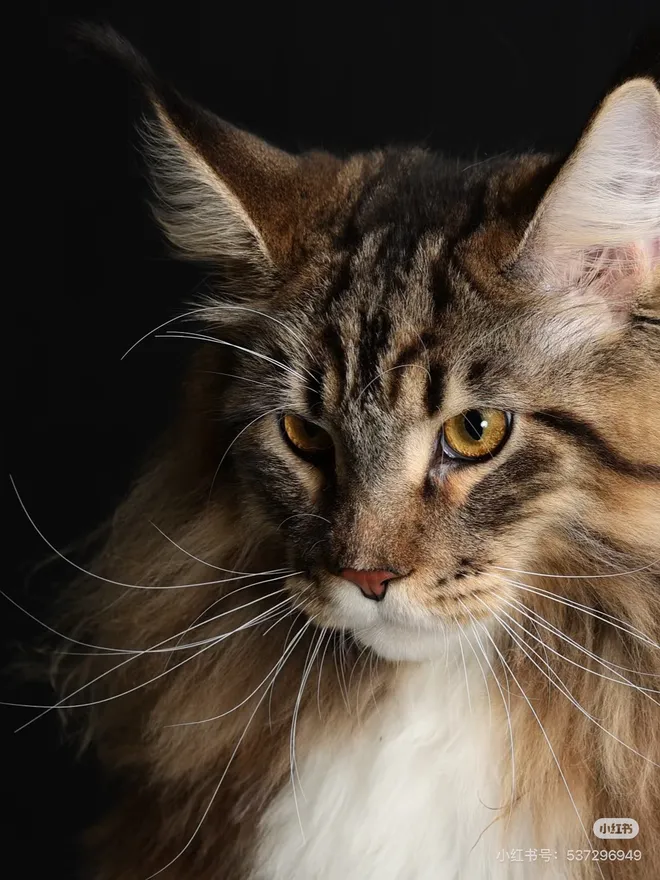
Have you ever looked at your cat and thought their eyes, whiskers, and little facial expressions deserved to be photographed professionally?
Close-up pet photography is one of the best ways to capture what makes your cat unique.
The good news is that you don't need an expensive camera or a professional photography studio. With AI, you can turn a simple phone photo into a beautiful close-up cat portrait.
What Makes a Great Cat Close-Up Portrait?
A great close-up portrait focuses on the details that make your cat recognizable.
These include:
- Bright, expressive eyes.
- Detailed fur texture.
- Clearly visible whiskers.
- Natural facial proportions.
- Soft, flattering lighting.
- A simple background that doesn't distract from the subject.
The goal is to make your cat the center of attention.
1. Take a Clear Photo of Your Cat's Face
Start by getting close enough to capture your cat's facial details.
Try these photography tips:
Use natural window light.
Soft daylight can bring out your cat's eye color and fur texture.
Focus on the eyes.
The eyes are often the most expressive part of a cat portrait.
Avoid strong flash.
Direct flash can create harsh shadows and unnatural reflections.
Keep the camera at eye level.
Photographing your cat from their eye level often creates a more personal and engaging portrait.
2. Choose a Professional Photography Style
Different portrait styles create different moods.
For a classic look, choose a clean studio background.
For something more dramatic, try a dark background with focused lighting.
For an elegant result, look for luxury editorial photography styles.
SoulPaw offers portrait styles designed to transform ordinary pet photos into polished AI artwork.
Some styles worth exploring include:
- Studio Portrait Series
- Dramatic Studio Portrait
- Luxury Editorial Portrait
- Watercolor Portrait
3. Generate Your AI Cat Portrait
With SoulPaw, you can upload multiple reference photos and choose the portrait style you prefer.
A simple workflow:
- Select 2–4 clear photos of your cat.
- Make sure the face is visible.
- Choose a portrait style.
- Generate your image.
- Download your finished portrait.
Using several clear reference photos can help preserve recognizable features such as fur color, facial markings, and eye appearance.
4. Where Can You Use Your Close-Up Cat Portrait?
A detailed cat portrait can be used in many ways.
- Frame it as wall art.
- Use it as a social media profile picture.
- Make it your desktop wallpaper.
- Create a personalized pet photo album.
- Give it to someone who loves your cat.
Sometimes the simplest portrait is the most meaningful.